Selecting regions and the return of an old strategy
After the mouse was added to the game the next big thing to add
was the selecting of regions. At the end of the previous post I had
already added a very rudementary selection method. Clicking on a
region will set a global variable that represents the index of that
region. This is done by reading the value at the mouse position on
the look-up texture. This is then halved and decremented by two in a
macro called LUKUP_TO_PROVICE.
static void select_region(GameMap* map, int x, int y, int panY) {
  ...

  fseek(map->lookup, map->lookup_offset + ((long)map->width * (y + panY) + x), SEEK_SET);
  fread(&lukup_value, 1, 1, map->lookup);

  if (selected_region == (LUKUP_TO_PROVICE(lukup_value))) // already equal
    return;

  selected_region = LUKUP_TO_PROVICE(lukup_value);

  if (selected_region < 0 || selected_region >= TOTAL_REGIONS) {
    selected_region = -1;
    return;
  }

  ...
}
This selected region variable is then used when new data is loaded from the map textures while scrolling. If the look-up texture when transformed is equal to the selected region variable the output pixel value will be the map texture + 16, which in the colour palette is set to a highlighted version of the texture colours.
At this point in the project the only way to view this change is to click on a region then scroll around so that it has been loaded out and then back into memory. So I implemented a very slow method which was to reload the entire background when you clicked on a region. As you can imagine this took a little while. About a second. Not what you want for what should be a very simple and small interaction the player has with the game. The first way to improve this that I thought of was to read from video memory and the look-up texture. If there was a match for the selected region then add 16 to the current value in video memory. This complicated things because with mode-x you have to select which plane to read from. While this method was still faster it still really wasn’t good enough. I tried including a top scanline and bottom scanline value for each region, then only doing the update for the section that needed it. This worked okay but had a bit of stutter, although, I still hadn’t added deselecting the previous region so it could only get slower. During this last method I contacted a friend who knew about VGA coding and I thought could help me out. He suggested using a flood fill algorithm. I went out for a walk and pondered this suggestion. I was really excited by it, I had been totally focused on a solution that made use of the look-up texture that I hadn’t even considered anything else. I first implemented the flood fill algorithm using recursion as I knew that algorithm off by heart. It had a slight pause on larger regions on the map but I knew that I wasn’t done yet. I tried giving it a go in assembly language but didn’t feel confident enough in my ability to do it. Maybe one day… I rewrote the algorithm in C using a stack instead of recursion and I was happy with this speed. It didn’t obviously stutter when you clicked on any regions, although I still hadn’t added deselecting regions because I noticed an issue. The Outer Hebrides.
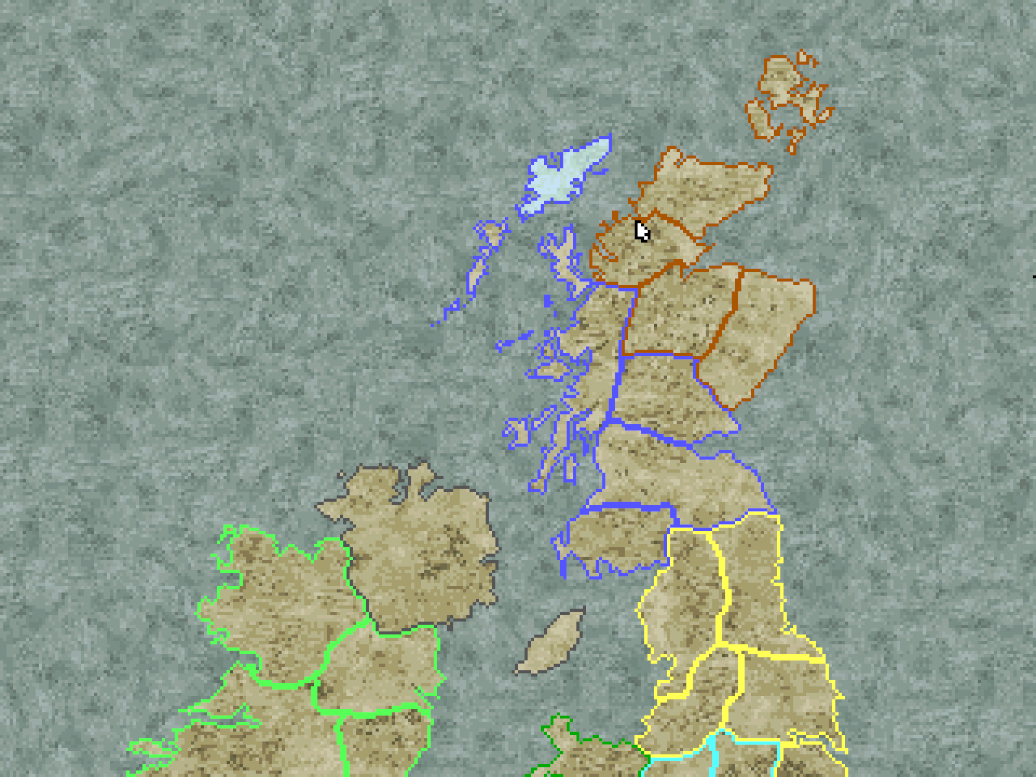
With flood fill a region that was made up of more then one island would not be fully filled. The way to get around this that I thought of was to use an array of fill points. When selecting a region, the flood fill algorithm would be called for each fill point of the given region. I then took some logical steps. I could simplify the algorithm and increase the number of fill points. With a simplified algorithm I would feel comfortable enough to rewrite it in assembly. I decided to write a line drawing algorithm which would add a value (given as a parameter) to each given pixel. This would do the operation for a given horizontal line. By giving the addition value as a parameter instead of a fixed value I could use this one function for selecting and deselecting regions by giving the values of 16 and -16. I wrote up a python script to take the look-up map and generate a binary file for all the lines of each region. This is where there is a return of an old strategy. When I started this project I thought the best way to load the map was to only use a look-up map and store it in a custom run-length-encoding file format. This obviously didn’t pan out, but here, I basically reused the file format. There is a basic header and then it stores each row in six bytes (Y, X1, X2). When all three values are equal to zero that region is complete and it can start loading for the next region. All regions are loaded at the start of the game so no file handling is done during the fill process. Once I added this in, selecting regions became much quicker, basically instant. I would have been happy to leave it at that but after a little bit of thought I realised it would be even faster if I use vertical lines instead, that way each line would only set the plane once instead of four times and there would be no complexity with offsetting the start address. This was also quite simple to implement. I just had to flip around my python script from left to right, top to bottom to top to bottom, left to right. I then had to rewrite the assembly for line drawing. The new assembly was considerably simpler. The only thing that had to be added was clipping for the lines. If a line ended before the start of the screen it was ignored, same with if it began after the screen. The start and end values were then clipped so they didn’t start before the screen or end after it. Another benefit of this method is that storing all of these lines takes up less space. While overall the size is larger using vertical lines, there is less variation between the different regions. I used a fixed array for each region and set it to have a max size given from the python script. With horizontal lines the max number of line segments per region was 142, with vertical lines it became 132. This is a nice little gain.
While reading Michael Abrash’s Black Book, he talks about
left-brained optimisations “using pointers and reducing calls” and
right-brained optimisations “understanding the problem and listening
for the creative whisper of non-obvious solutions”. This feels like
a good example of this. At the start I was dead set on using the
look-up texture. I could have rewritten it to the most optimised
assembly possible but it still would have been slow. Reading from a
file like that is always going to be a massive bottle-neck. It just
takes a step back, or another perspective to realise there may be a
different solution that is much faster purely because it approaches
the problem from a different direction. Once I saw the gains from
the new approach I could return to using left-brain optimisations
like seeing that vertical lines simplifies the code and reduces the
total number of OUTS. Maybe the solution reached at the
end here was obvious to you from the start but, we learn from our
experiences and I thought it was worth sharing.